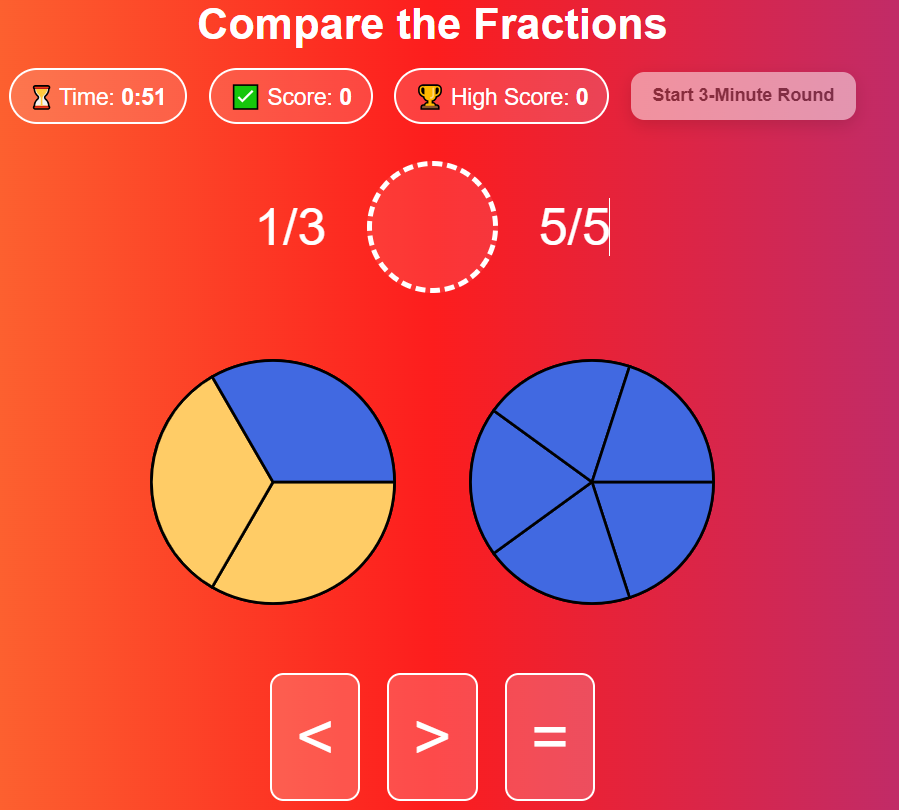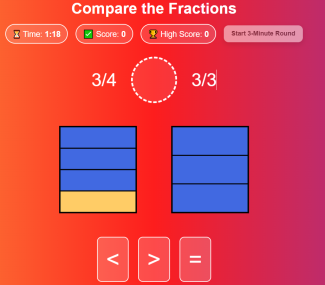
Compare the Fractions is a fast-paced, interactive fraction game that helps students build visual understanding of fraction size using hands-on models and quick comparison practice.
In each round, students are shown two random fractions and must decide whether the first is less than (<), greater than (>), or equal to (=) the second. To support reasoning, the activity generates two visual fraction models for every question—either circle “pizza” slices or rectangular fraction bars—and students can tap/click pieces to shade them in. This makes it easy for learners to “see” each fraction before choosing the correct comparison symbol.
The game runs as a 3 to 10 minute timed challenge with a live score counter and a high score tracker that saves automatically on the device (so students can try to beat their best). Instant sound effects and visual feedback reinforce correct answers and help students adjust when they make mistakes. Simple controls, large symbols, and touch-friendly design make it ideal for math centers, small-group practice, intervention, or whole-class play on a projector or interactive board.