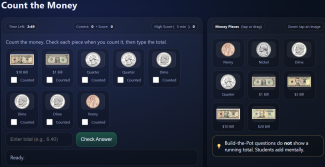
Count the Money is a touch-friendly, classroom-ready money-counting game that helps students practice real-world currency skills using U.S. coins and bills. Built for interactive whiteboards, iPads, Chromebooks, and laptops, it gives students repeated practice counting mixed money and building exact dollar amounts—without the app doing the math for them.
What students do
- Count & Type: Students view a set of coins/bills and type the total amount (up to $20.00).
- Build the Amount: Students see a target amount and drag or tap coins/bills into a “Money Pot” to match the value. The game does not show a running total, encouraging mental math and number sense.
Built-in engagement
- Timed gameplay: Teachers choose a session length (1, 3, 5, 7, or 10 minutes). The game ends automatically when time is up.
- Star Bonus rounds: Every two correct answers unlock a quick 10-second star game where students tap stars for extra points—great for motivation without distracting from learning.
- Positive feedback: Correct answers trigger happy sounds and rotating compliments; incorrect answers trigger a “try again” sound and encouraging messages.
Teacher-friendly features
- Tracks accuracy: The header shows how many questions were answered correctly.
- Simple scoring: +5 points per correct answer, +1 point per star.
- High score by timer length: Stores local high scores on the device for each timer option (perfect for centers and friendly competition).
- Student support tools: Counting questions include a checkbox on each coin/bill so students can mark items as they count.
- Zoom on money images: Students can tap any coin or bill to zoom in, making it accessible for younger learners and whole-class demonstrations.
Great for
- Math centers and rotations
- RTI/Intervention practice
- Whole-group warm-ups on the projector
- Sub plans and early finisher work
- Home practice with families

Find more educational resources, worksheets, labs, activities, games and teacher tools at EducationalResource.org.